 Skip to content


For e-shop owners who advertise their products via the Google Shopping interface, Google Merchant Center (GMC) is likely a familiar tool. Its primary role is to ensure the correct formatting of product listings, enforce the policies set by Google, and at the same time help ensure that your advertising campaigns reach the right customers.
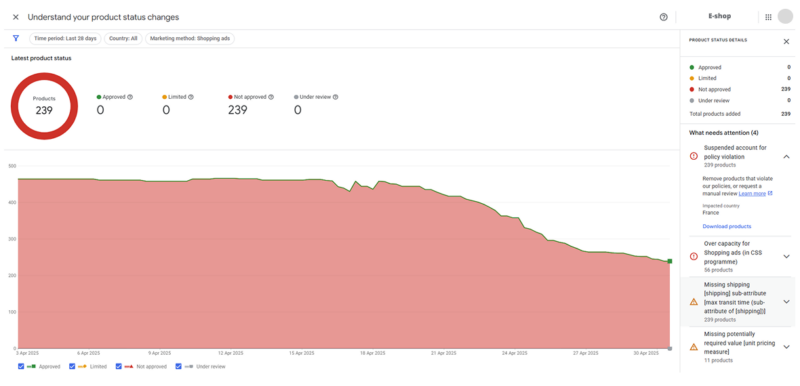
Source: Google Merchant Center Next
Every advertiser actively working with GMC has probably encountered a situation where some of their listed products were disapproved. Such situations are quite common but represent a frustrating obstacle for any e-shop owner, as they disrupt carefully planned marketing efforts. When products are disapproved, they stop appearing among Google Shopping ads, which may slow down campaigns or, in worse cases, lead to their suspension. Fortunately for advertisers, such disapproval does not automatically result in removal from free listings.
Google Merchant Center is a strictly regulated ecosystem that monitors consistency between the product feed and the actual content on the advertiser’s website. Any inconsistency, error, or violation of the rules can result in product disapproval. However, this can often be quickly resolved if you identify the cause of the issue and know how to correct it. For this reason, we’ve prepared a summary of the most common disapproval reasons along with steps on how to effectively resolve and prevent them.
Most Common Reasons for Product Disapproval
Product disapproval in GMC is usually not accidental – it is most often caused by incorrect account settings, errors in the product feed, or violations of Google’s advertising policies, which are quite extensive. That’s why it’s important for advertisers to be aware of the most common reasons for disapproval so they can proactively prevent them.
As previously mentioned, one of the most frequent causes is a mismatch between the product feed and the product’s web page. Google automatically compares parameters such as price, availability, product title, and description. If this information does not match, the product may be automatically disapproved. This problem most often arises when manual changes are made on the website without corresponding updates to the feed. Issues can also occur with shipping and tax information. If this data is missing, inaccurate, or inconsistent with the website, it can lead to disapproval. Therefore, it is essential to keep shipping costs, tax rates, and product availability up to date and consistent across all platforms, including both the website and the product feed.
Google regularly updates the list of prohibited or restricted products (such as weapons, tobacco products, or dietary supplements with unverified effects, etc.). For this reason, another common cause of disapproval is advertising these products, which in some cases can lead to the suspension of a campaign or even the entire account. However, the rules apply not only to the product itself but also to the way it is presented – ads must not be deceptive, manipulative, or contain false claims. A very important aspect of product evaluation is the language used in the description. Certain phrases can lead to disapproval, especially if they relate to sensitive topics. Therefore, it is essential to regularly review product descriptions and remove problematic or inappropriate language that could be considered misleading or unethical.
Another frequent cause of disapproval is an incorrectly filled or incomplete product feed. Common examples include missing or incorrect product identifiers such as GTIN or MPN, which Google requires for accurate and trustworthy product representation. If a GTIN or another required identifier is not available, it must be manually indicated in GMC.
Other common mistakes include incorrectly entered landing page URLs – if the URL does not lead directly to a specific product, but instead to a homepage or a non-existent subpage, Google will disapprove the product. Similarly problematic are duplicate products or technical errors that occur during migration between systems. Disapproval may also occur if a product is marked as available in the feed but is actually out of stock on the website. Therefore, it is crucial to regularly update product availability in the feed and ensure that all information is accurate and matches what is displayed on the e-shop.
Lastly, images are also an important factor in product approval within GMC. They must be high-quality and free from any distracting elements such as watermarks, promotional text, or frames. Using an inappropriate image can lead to product disapproval, so it is important to follow the recommended visual standards. Advertisers can now edit their product images directly in GMC using the Product Studio tool, which significantly simplifies compliance with visual requirements.
What to Do When Products Are Disapproved
- Identify the issue: In GMC, go to the “Products” section and then select the “Needs attention” option, where you will find a detailed overview of disapproved or problematic products along with descriptions of the issues.
- Fix the errors in the product feed: Check that the data matches your website. Focus particularly on price, shipping and tax information, product URLs, and product availability. If some products do not have identifiers such as GTIN or MPN, be sure to manually indicate this directly in GMC to avoid disapproval.
- Request a Review: after making the necessary changes, go to the “Products” section in GMC Next and click on the “Needs Attention” tab. If the issue is at the individual product level, select the affected product, click on “Fix,” and then choose either “I’ve fixed the issue” or “I disagree with the issue” in the details view. After that, click on “Request Review.” Google typically reassesses the product within 24–72 hours. However, if the issue has been identified at the Merchant account level (e.g., due to a policy violation), it is not possible to request a review for individual products. In such cases, you must first resolve the underlying issue affecting the Google Merchant Center account and then click on “Request account review.” This will submit a request for the entire account to be re-evaluated.
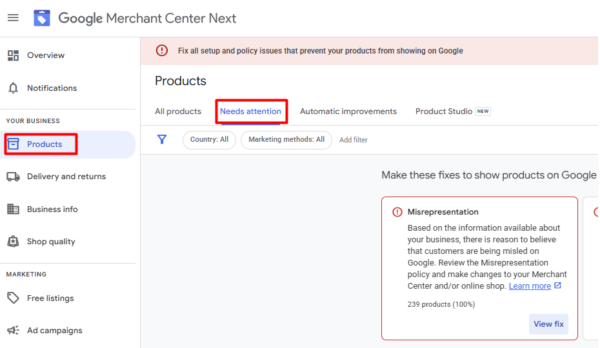
Source: Google Merchant Center Next
How Can Advertisers Prevent Issues?
Error prevention is key to the long-term functionality of advertising campaigns. The best way to avoid product disapproval in GMC is to regularly update the product feed and ensure full synchronization with the website. Before submitting the feed, it is essential to thoroughly verify all data – titles, descriptions, prices, images, identifiers (GTIN, MPN), and shipping information. It is also important to monitor alerts directly in Google Merchant Center and have active email notifications enabled to stay informed about new issues. However, you should not rely solely on these alerts, as some issues may be displayed with a delay or may already have been resolved.
In the case of recurring technical problems, a temporary solution may be to change the product ID, which breaks the link to the original issue. Overall, regular monitoring and optimization of the feed using specialized tools significantly reduces the risk of product disapproval and helps keep campaigns running smoothly without interruptions.
Conclusion
Product disapproval in Google Merchant Center can be a very frustrating situation for advertisers, but it is relatively common. Disapproval by GMC is not random and is typically caused by incorrect GMC account settings, product feed errors, or violations of Google’s advertising policies. In most cases, however, these issues can be easily resolved, especially if advertisers understand the exact reason for the disapproval. Product disapproval—and consequently, campaign suspension—can be effectively prevented by regular feed monitoring and optimization, as well as by keeping the feed synchronized with the e-shop.
You can simplify campaign management by using available automation tools, including our BlueWinston platform. Additionally, you can always turn to Google’s CSS partners, who can not only offer better pricing conditions but also provide certified support in case of any issues. Our Shopping in EU team is among Google’s premium partners, so if you have any questions or uncertainties, feel free to book a free consultation with our PPC specialists, or try our services free of charge and without obligation for 30 days.