 Skip to content



How to Get Your Loyalty Program’s VIP Prices Directly into the SERP
The battle for positions in Google Shopping often devolves into a race to the bottom—whoever offers the lower price gets the click.
The problem is that with blanket price cuts, you are burning your own margin even with customers who would have bought from you at full price. However, on March 25, 2026, Google rolled out an update that changes the dynamics of pricing in search.
Instead of hiding discounts in emails, you can now show them directly in product ads.
But there’s a catch: Only your loyal customers will see them.
Here is a technical look at how Google connects Merchant Center with your first-party data and why this should be your priority for this quarter.
How Hyper-Personalization Works in Shopping
The cornerstone of the update is the integration of loyalty programs into ad spaces. If you have a customer in your VIP club, Google can display the following on your product in the SERP:
- Member pricing, which visually dominates the competition.
- Member shipping, for example, free delivery for the “Gold” tier.
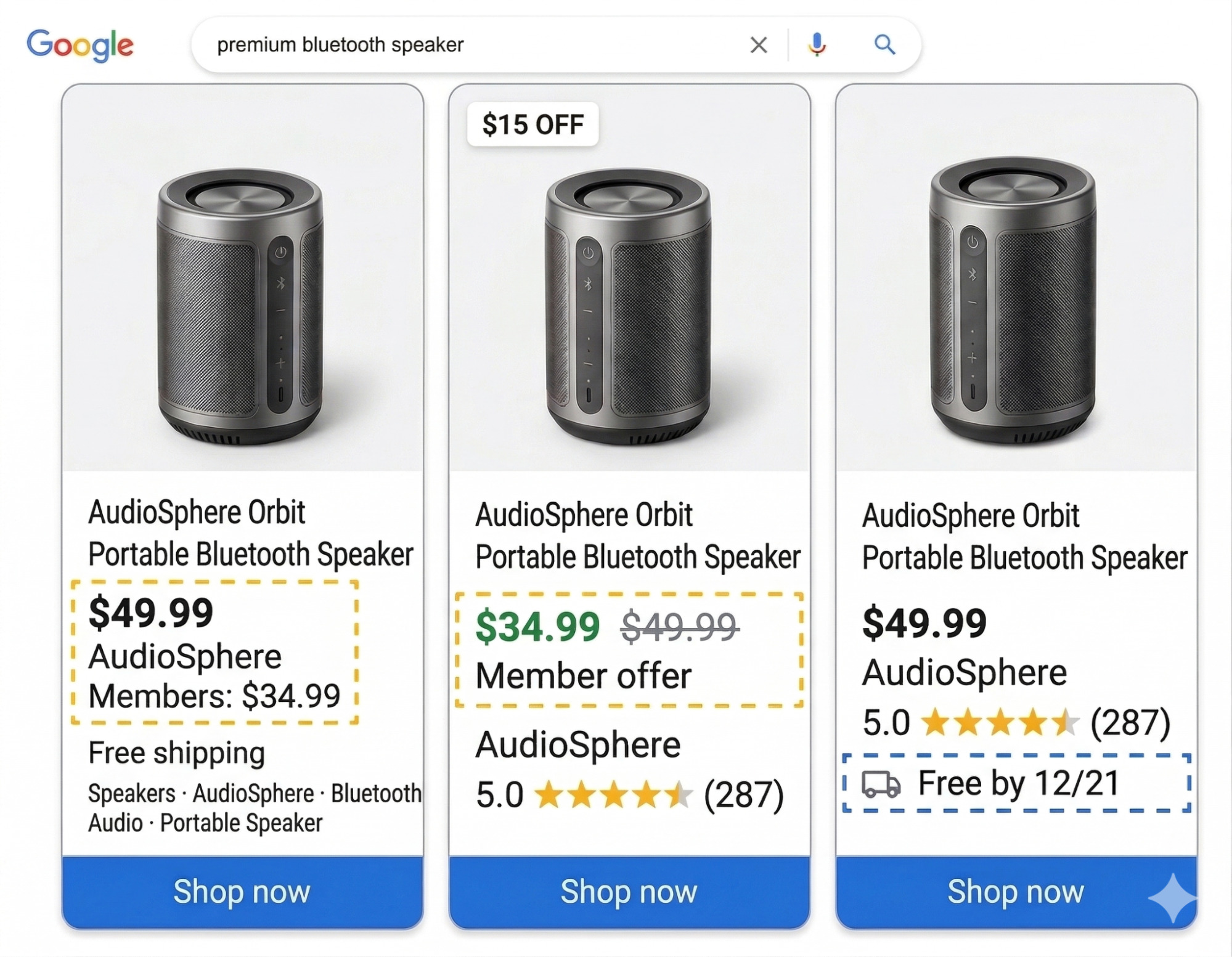
Source: Created using AI based on Google support
According to Google’s data, such targeted display of benefits to existing customers brings a Click-Through Rate (CTR) increase of up to 20%. At the same time, you effectively cut off the competition because your loyal customer immediately sees that you offer conditions no other e-shop can match.
Another novelty is that this data is no longer limited to classic Shopping. Google has started pushing it into Local Inventory Ads, which is a huge advantage for omnichannel retailers with brick-and-mortar stores, as well as into its AI interfaces, including Gemini and AI Mode spaces.
Expansion Note: The feature is currently running in 14 countries (Brazil, Japan, Canada, the United Kingdom, India, France, Australia, Germany, Mexico, South Korea, Italy, the United States, Spain, the Netherlands). If you manage campaigns for foreign markets, you can deploy this feature immediately.
Technical Implementation
Where the Feed Meets Customer Match
For agencies and PPC specialists, this means setting up two isolated systems that must communicate flawlessly.
1. Modifying the Data Feed (Google Merchant Center)
In the first step, you must activate the loyalty programs add-on in GMC and subsequently enrich your XML/CSV feed with new attributes. The key attribute is [loyalty_program]. Within it, you must nest precise definitions:
- Setting up tiers and member prices.
Assigning specific shipping via the [shipping_label] attribute, if, for instance, free shipping only applies to selected product categories for members.
(You can study the detailed specification of supported attributes HERE).
2. Customer Match (Google Ads)
Submitting the modified feed is not enough. Google needs to know who to show the member price to.
This is where Customer Match comes into play. Your task is to match your CRM email databases (segmented by loyalty tiers) to audiences in Google Ads. The synchronization of first-party data via Customer Match is a strict prerequisite for displaying the strikethrough price and benefits.
Pro Tip: Zabezpečte si automatizovaný prenos dát z vášho e-shopu do Google Ads (napr. cez API alebo nástroje ako Zapier/Make). Zákazníci neustále menia svoje VIP úrovne a manuálne nahrávanie CSV súborov by rýchlo viedlo k zobrazovaniu nesprávnych cien, čo Google prísne penalizuje zamietnutím položiek.
What’s Next?
(Beta for Free Listings)
An interesting aspect of this update is a pilot program currently underway in the US.
In it, Google is testing the use of Customer Match data not just for paid campaigns, but directly as a source for organic Free Listings. This means we will likely soon be able to personalize the organic feed directly based on a user’s purchase history.