 Skip to content


In 2025, Google is changing the way it evaluates the trustworthiness of merchants. A nice-looking online store, fast shipping, or a well-optimized product feed is no longer enough. If your Google Merchant Center account has been suspended and you want to reinstate it, Google may now require much more than just fixing your website.
The new reality? Video verification.
Google is currently testing a stricter method of verifying merchants, aimed at removing fraudulent online stores, anonymous sellers with no real background, and websites created solely to “make a quick profit” without providing real value.
What has changed?
Google has decided to tackle the issue of untrustworthy merchants head-on. It’s no longer just about verifying documents or making technical adjustments. Merchants are now required to provide real proof of their business’s existence in the form of a video.
In practice, this means that if you want to request a reinstatement after your Google Merchant Center account has been suspended, you may be asked to record a 3-5 minute continuous video that shows Google your business is real.
And here’s the critical part: you only get THREE attempts. If you fail all three, your account will remain permanently suspended.
How does video verification work?
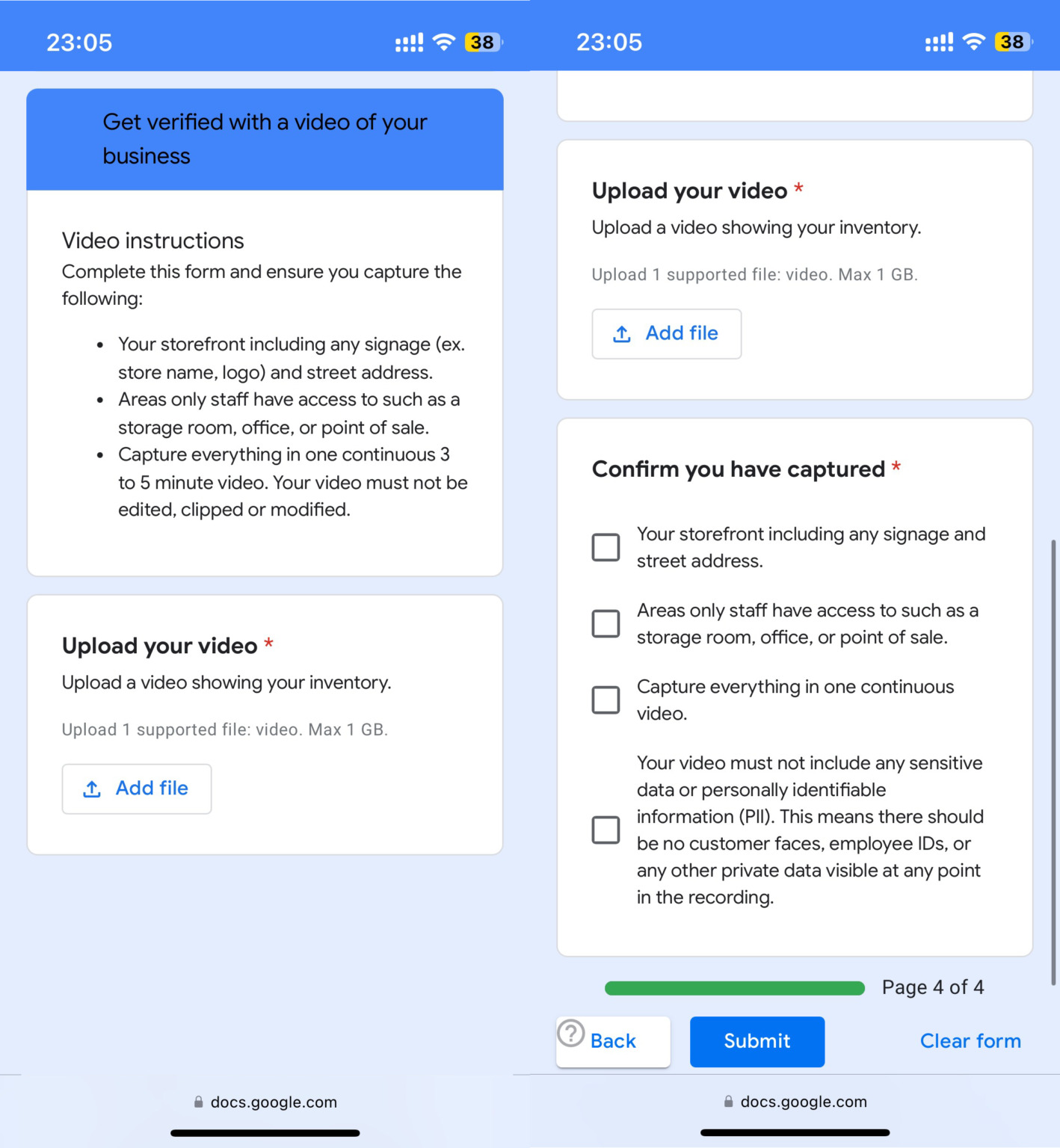
Google requires merchants to film an uninterrupted, unedited video showing their business in real time. This video must include the exterior of your premises with visible signage, your business name, and the physical address.
In addition, it must show staff-only areas such as your storage room, office, packing area, or point of sale. Finally, you’ll need to showcase actual products – ideally your most valuable ones – including how they are packaged and stored.
Source: Seroundtable
What’s the purpose of video verification?
The purpose of video verification is to clearly demonstrate that a business truly exists, with a real physical location, staff, and actual products. Google wants to ensure that merchants are not presenting a false image of their operations, but are fully transparent and trustworthy.
Why is Google being so strict?
This change is not accidental. Over the years, the platform has been overwhelmed by anonymous dropshipping stores selling identical products with copied descriptions. There have also been frequent issues with fake data in product feeds and online shops lacking contact details, terms and conditions, or any proof of real-world existence.
That is why Google is raising its standards. Not to make life harder for honest merchants, but to effectively separate those who are truly trustworthy from those who are only trying to appear that way.
How to prepare for video verification
If you’ve been asked to complete video verification, do not treat it as just another checkbox. It’s a crucial step that can determine whether Google reinstates your account or not.
Start with an audit
Begin with a thorough audit of your Google Merchant Center account. Review the “Account issues” section and pay close attention to the email from Google outlining the reason for your suspension. Identify any technical, content-related, or legal shortcomings.
Improve your website’s trust signals
Next, focus on improving your website’s credibility. Make sure it is secured with HTTPS, includes accurate contact information, and has clear policies for returns, delivery, and data protection visible in the footer. The purchasing process must be clear and easy to understand. Without these basics in place, video verification alone won’t help.
Sync your product feed with your website
Ensure your product feed matches your website in terms of pricing, availability, and descriptions. Google penalizes discrepancies and missing identifiers like GTINs. Misleading or vague product descriptions can also trigger suspension.
Record the video correctly
Once everything is in order, film a 3 to 5 minute uninterrupted video – no cuts, edits, or enhancements. Show the exterior of your business, your storage, office spaces, and actual products. Check for proper lighting, sound, and stability. Hide any sensitive information such as customer names or accounting documents.
Submit your reinstatement request
Finally, only submit your reinstatement request once you are fully prepared. In the appeal form, clearly explain what you have fixed and provide supporting evidence. Never include false information – Google will detect it, and your request may be permanently rejected.
The most common reasons for account suspension include: misleading information (fake discounts, hidden fees), inconsistencies between the feed and the website (different prices, availability, or descriptions), lack of trust signals (missing address, poor-quality website, absent policies), technical errors (unsecured website, non-functional checkout, broken links) and weak content (copied descriptions, low-quality images, SEO spam).
Stay one step ahead, not three strikes behind
This test is an opportunity, not a threat. Today, Google doesn’t just want to see an “online store.” It wants to see a real business, one that demonstrates trust, quality, and a clear identity. And it wants proof.
If you want to succeed, don’t try to just “pass” video verification. Use it as an opportunity to prove your store is built on solid ground. Google gives you only three chances but if you do it right, one is enough.
Conclusion
Video verification isn’t just a new form to fill out. It’s a test of credibility. For honest merchants, it’s a ticket back into the game. For the rest, it’s the end of the show.